Standards for Mathematical Practices in the Elementary Classroom

Standards for Mathematical Practices

This year my school district adopted a new K-5 math text. This new text is more aligned to my state’s standards and emphasizes number sense strategies much more than in the past. It’s been a change from what’s been used over the past few years. One of the major shifts involves the use of using multiple strategies and visual models to put together and take apart numbers.  Although they aren’t explicitly taught in our newly adopted math text, the Standards for Mathematical Practices (SMP) are highlighted as part of the CCSS.

Just like many educators, I have a child-friendly SMP poster hanging around my classroom. As the months passed I feel like I haven’t been referring to the SMP as much as I should. This is a missed opportunity. The poster has started to fade (literally) and students haven’t been referring to them since the very beginning of the year.  I doubt students notice it anymore since it’s basically blending into the wall.  One of the benefits of using the SMP is being able to refer to them while teaching.  Perseverance, using the right tools and attending to precision happen just about every day.

So after introducing the concept of pan-balances, I decided to have the students revisit the SMP.  I felt like the students were having a challenging time persevering.  Okay … that’s an understatement.  They were struggling and were very willing to tell me about it.  I stopped the class and we had a brief discussion on the meaning of being able to persevere in math class.  The talk on perseverance lead to discussing the SMP in more detail. I wanted students to internalize their meaning and see how it applies to their math learning. The class had a conversation about the different mathematical practices and how they’re used. The math discussions that followed were amazing. Students started to find examples in their own lives of how the SMP connect to what we’re doing in class.  The class finished the lesson on pan-balances with a renewed approach.  A few days later I had students complete an activity related to the SMP.

I printed out eight sheets with a standard practice statement on each one.  Students were grouped into pairs and asked to draw a picture that represents a particular SMP.  The picture also needed to include some type of caption or written statement. Students first put together a rough draft, refined their idea and created a final product. The final product was cut out and glued onto our SMP board. A few examples are below.

This slideshow requires JavaScript.

Thursday night was my school’s annual open house. Parents and students come into the school and visit the classrooms during this time. It was great to see my students become tour guides and show their parents the role the SMPs play in their learning and how they approach math.

Students cut out and placed their SMP    visualization  on this board.
Students cut out and placed their SMP visualization on this board.

Overall, I thought the activity  brought more awareness to the SMP and what role they play.  I’m hoping to revisit this board throughout the year.
Using Excel to Explore Rates and Proportions


My fifth graders are currently studying rates and proportions. Earlier in the week they explored rates by looking at unit prices and solving problems with some type of cross-multiplication strategy.  Although they’ve made progress I still feel as some many still need to cement their understanding of a ratio and proportion. So it was time to switch up the instruction model.

I decided to go with using a spreadsheet. In this case, the spreadsheet would be in the form of an Excel document. Each student grabbed a laptop and opened up Excel. The students used Excel earlier in the year so they were familiar with some of the basic functions.

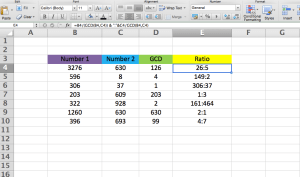
After entering a few text cells, students were asked to put a random number above zero in cells B4 and C4. Then the class discussed what GCD stood for. Most of the students said “greatest common denominator.” That response made sense because that’s heavily emphasized in fourth grade as students add and subtract fractions. In this case, GCD means greatest common divisor. The class then discussed what that meant when comparing two numbers and the helpfulness in finding the GCD when exploring equivalent fractions. The discussion then transitioned from equivalent fractions to finding ratios.

Students entered in the formula =GCD(b4,c4) to find the GCD of the two different numbers. Students observed how the GCD changed as they updated their numbers.

Screen Shot 2015-04-17 at 7.30.47 PM

The next part was a bit tricky. I asked the students to write a formula to express the ratio in simplest form. The class used the GCD and trial and error to come up with the ratio formula. Once students wrote the formula and placed it in E4.  Students then explored how the ratio changed when their numbers were updated.

Screen Shot 2015-04-17 at 6.51.42 PM

The class then reviewed why the formula actually worked.  The class discussed that basically the formula took each number and divided it by the GCD of both numbers. What was great was that students were starting to connect the reasoning behind the creation of a ratio. Instead of just cross-multiplying, students are starting to show a deeper understanding of how ratios are constructed and the process used to simplify. The students were able to save and print out their spreadsheets for later review.

Resources:

Excel Template

Example for Class Use


Math Menu Boards

mathmenu-01


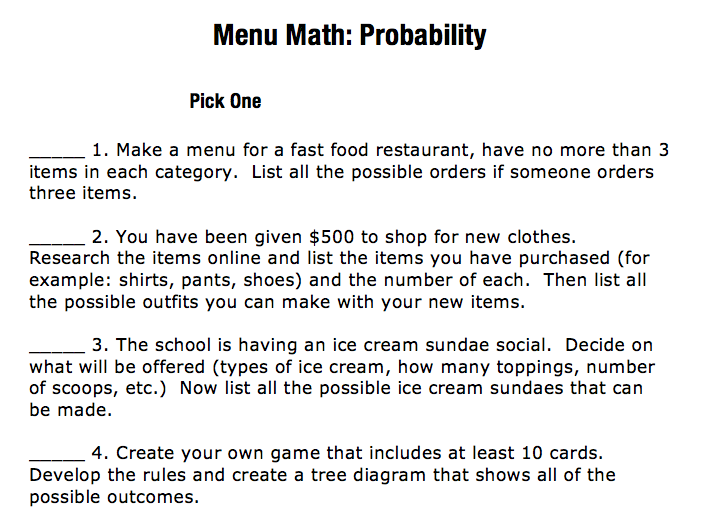
My fifth grade group has been learning about probability for the past few weeks. Our class discussion have revolved around probability trees and likelihood concepts. The summative assessment on probability is coming up around the corner so last week I was scouring my resources to find a way to review some of the concepts taught earlier in the unit. One of my colleagues and I had a conversation about the idea of using a menu board. I heard of using them through #msmathchat but haven’t used them much. I’ve always thought that giving students a choice in their assignments matters. I feel like an assignment menu encourages student choice and often increases engagement.

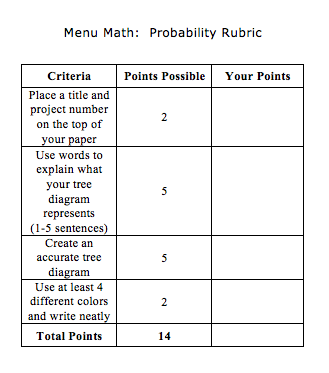
So I found a probability menu resource and decided to use it with my fifth grade crew. I added a rubric and a few other options to Yuliana’s template.  Here is the template that I adapted and used for this project.

Screen Shot 2015-04-06 at 7.33.21 PM

Screen Shot 2015-04-06 at 7.30.23 PM

After explaining the directions I fielded a few different student questions. During the question time some students needed more clarification than others. A group of students were confused to what the expectations were.  Many of them are used to playing school and expect the teacher to tell them what assignment or what to do to get all of the points on an assignment.  I feel like menu boards, to a small extent, help students become more self-directed in their learning journey. It was encouraging to see some of the students take the reigns and be assertive in deciding which menu option to complete.   After all the questions were answered I gave students time to complete the project.  Students completed the work in just over two class sessions.  After reviewing all of the projects I decided to reflect on the entire process. Here’s what I need to remind myself the next time I have the students create a menu board project:

  • Students need time to brainstorm before creating. I had a few students that immediately started working on their project just to throw it out five minutes later. These particular students didn’t brainstorm or organize their ideas before starting a final copy. On the opposite end, I had students that took out scratch paper and started to write out a few ideas before carefully crafting their project.
  • Students need checkpoints along the way. Throughout the project I had to remind students to check the rubric and generally check-in with students to answer questions and provide feedback. During this time I also had to ensure that I had the technology in my classroom ie. iPads and computers. Next time I assign a similar project I’m thinking of having students fill out a work log to help keep us all on time.
  • Students need time. They need time to put together their thoughts, create and produce a product that follows the minimum guidelines. Some of the students took around two class periods while others took longer. Ensuring that other assignments are in place after the project is important. Having additional work afterwards is important. It also helps eliminate the dreaded “what do I do next?” questions.
  • Review the projects. I reviewed each project with the students. I tried to limit my own talking, which was difficult, and let the students explain their project. During that time I filled out the rubric with the student. The time spent discussing the student project was vital. Students came ready to speak to me on what they created and what they thought was important. Some of the student projects were amazing and other projects needed a bit more work. The majority of students put a decent amount of effort into the project and met the minimum criteria.

This project took a good amount of time and had students create a product that was aligned with different probability standards. I thought it was worth the time and I’d like to bring out the project at some point next year.