Math Podcast Project

Math Podcasts

For the past few years my students have completed a classroom evaluation form near the end of the school year.  The purpose of the evaluation is to reflect on  the progress made throughout the year and to highlight beneficial learning experiences.  Based on past survey results, students seem to rate learning experiences related to technology and collaboration higher than independent projects.  Not a big surprise here, but my elementary students seem to thrive when given a choice on how to present content with a technology component.

One of the more highly rated projects this year was the inquiry based math podcast project. The math podcasts gave students an opportunity to use technology and incorporate creativity into their projects.  Notice I said their.  I think what helps make this project so beneficial is that students take ownership of the project. That ownership isn’t often related to any extrinsic reward (maybe peer pressure?), but a self-conscious effort to communicate what they’ve learned.  Many students noted the topic of student ownership and this project on the end-of-year evaluation.

As with any student project, there were guidelines and a lot of planning.  I used a rubric to help guide the projects along and had specific check-in points to give feedback.  Time can really get away from the teacher if guidelines aren’t established and enforced.   Click on the images below to find Gdoc templates.

Script
Rubric

The students were split up into groups of two to complete the project.  The teams were randomly chosen.  Each team received the directions and a rubric page.  Each team then created a script that was eventually approved by the teacher.

Script
Script

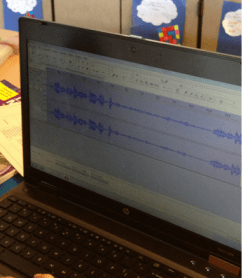
The students were given approximately 30 – 60 minutes once a week for approximately two months to work on this project.  The free program Audacity was used to create and mix the recorded sounds. Creative Commons sound effects were used and can be found with a quick Google search.   This can also be an opportunity to have a conversation about attributing credit to sources.  Some students needed extra time and it was given.  Student groups then presented their podcast to the class and answered questions from the audience.  The projects were then shared with the community.  Overall, I thought that the skills reinforced/learned through this activity justify the amount to time that was dedicated to the project.  I’m hoping to incorporate more of these projects into my classroom next year.

How do you use math projects in class?


Using End of Year Classroom Survey Data

Screen Shot 2013-06-04 at 10.19.34 PM

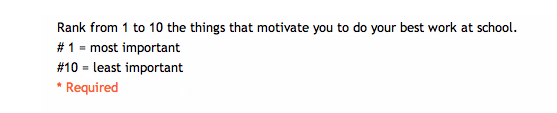
For the past few years I’ve used a student motivation survey with my class.  The survey is used for reflection purposes and to plan for the next school year.  This year approximately 80 students in grades 3 – 5  answered questions related to what helps them learn best.  The statements are below (click picture to enlarge).

n.survey

I usually explain each question to the class and then the students  individually respond as they see fit.    After the results were compiled and averaged (1 being the most important, 10 being the least), I shared the top three motivators.  They are as follows:

  • The teacher shows she/he cares about you and the other students in class – 1.20 / 10
  • The teacher is fair to all students in the classroom – 1.22 / 10
  • The teacher allows you to use technology to learn – 2.02 / 10 

After the results were presented, the class had a discussion regarding why they felt the motivators were especially important.  I also shared that the results were very similar to last year’s results.   One key takeaway was that having a teacher that cared about them was extremely vital in motivating students to learn.  This isn’t surprising, but a passionate teacher can be contagious and elementary students often feed off of that excitement.  Another takeaway, relationships matter in the classroom.  Also, it seems that technology continues to play an increasingly important role in the learning process.

I then presented the bottom three categories.  The bottom three aren’t necessarily negative, but they scored the least important out of all the categories. The class then discussed why they felt like those categories deserved a less than stellar score.

  • The teacher gives choices to complete an assignment – 5.51 / 10
  • The teacher allows you to move around the classroom – 4.43 / 10
  • The teacher gives assignments that connect to the real world – 3.53 / 10

At that point I thought it might be beneficial to bring up the topic of motivation and rewards in the classroom.  This year I decided to eliminate material rewards (pencils, stickers, auctioned prizes, etc.) to reward my elementary students.  It took some research and a bit of teeth grinding, but I went cold turkey with the external rewards this year.  This was a shift from years in the past.  After analyzing the positive results and increase in student ownership, I may do the same next school year.

Using Skype to Learn about School Communities

Screen Shot 2013-05-30 at 8.52.11 PM

Throughout this school year my class has been focusing in on the topic of community. The class has engaged in learning activities related to building a positive classroom community of learners.  We’ve co-created anchor charts and thoroughly discussed what our learning community looks like.  While searching for new ideas, I came across a unique idea … a classroom was going to have a Skype session with many different schools across the world about the topic of community.  I decided to sign up for this activity a few weeks ago.

Screen Shot 2013-05-30 at 8.54.12 PM

Before the Skype, guiding questions were developed by the host.

Screen Shot 2013-05-30 at 9.01.20 PM

I confirmed my class’s participating with Katy and my students were split into three groups. One group became the welcoming party.  Students created signs and communicated the school’s demographic and geographical data.   The second group was designated as the research group.  This collection of students researched information about the local and school community.  In doing so, the students also were reminded of how much of an emphasis we put on creating a positive learning community in the classroom.  This group put together a small presentation for the 5A class (Katy’s class).  The third group, the questioning group (still looking for a better name for this group), was directed to create at least 10 questions that the 5A school would answer.  This group was also expected to answer the questions that were asked from the other school.

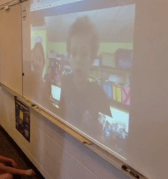
Today my class had a chance to Skype with Katy’s class from New York City. Katy’s tireless fifth grade class engaged in approximately 15 different Skype sessions in one day – that’s some perseverance.

Screen Shot 2013-05-30 at 8.51.58 PM

The Skype session involved both schools discussing the topic of community.  My class learned about 5A’s class community and they learned about ours.  The total session lasted around 25 minutes.  Afterwards, the class reviewed and compared the two communities.  My class was especially intrigued that 5A had recess on the roof!

This  method of comparing communities through Skype seemed to enhance the learning experience.  Soon after the Skype session ended, my students wanted to research other communities around the world.  This may be a kick-off to #geniushour projects in the fall.

What do you think?  Have you tried Skyping with another class to learn about community?

Math: In Response to Your Question


I’ve been exploring the use of multiple solution problems in my math classes.  These types of problems often ask students to think critically and explain their mathematical processes thoroughly.  To be honest, these questions can be challenging for elementary students.  Most younger students expect or have been accustomed to finding one right answer throughout their academic career. Unfortunately, state and local standardized assessments often encourage this type of behavior through multiple choice questions.  This type of answer hunting can lead to limited explanations and more of a focus on only one mathematical strategy, therefore emphasizing test-taking strategies.  Encouraging students to hunt for only the answer often becomes a detriment to the learning process over time.  Moving beyond getting the one right answer should be encouraged and modeled.  Bruce Ferrington’s post on quality over quantity displays how the Japanese encourage multiple solutions and strategies to solve problems. This type of instruction seems to delve more into the problem solving properties of mathematics. Using this model, I decided to do something similar with my students.

I gave the following problem to the students:

How do you find the area of the octagon below?  Explain the steps and formulas that you used to solve the problem.

Octagon Problem

At first many students had questions.  The questions started out as procedural direction clarification and then started down the path of a) how much writing is required? b) how many points is this worth? c) how many steps are involved? d) Is there one right answer?  I eventually stopped the class and asked them to explain their method to find the area of the octagon, basically restating the question.  I also mentioned that they could use any of the formulas that we’ve discussed in class.  Still, more questions ensued.  Instead of answering their questions, I decided to propose a question back to them inorder to encourage independent mathematical thinking.  Here are a few of the Q and A’s that  took place:

SQ = Student Question         TA = Teacher Answer

SQ:  Where do I start?

TA:  What formulas have you learned that will help you in this problem?

SQ:  Do I need to solve for x?

TA:  Does the question ask for you to solve for x?

SQ:  Should I split up the octagon into different parts?

TA:  Do you think splitting up the octagon will help you?

SQ:  How do I know if the triangle is a right angle?

TA:  What have we learned about angle properties to help you answer that question?

Eventually, students began to think more about the mathematical process and less about finding an exact answer.  This evolution in problem solving was inspiring.  Students began to ask less questions and explain more of their thinking on paper.  At the end of the math session students were asked to present their answers.  It became apparent that there were multiple methods to solve the problem.  Even more important, students started to understand that their perseverance was contributing to their success.  The answer in itself was not the main goal, but the mathematical thinking was emphasized throughout the process.

Afterwards, students were asked to complete a math journal entry on how they felt about the activity.

Image Credit: Kreeti

Using Twitter and Vine in School

Sharing

Parent/teacher communication is key in and outside of the classroom.  Educators, no matter what level they teach often communicate with parents through face to face conversations, emails, phone calls, and letters.   Generally, elementary teachers type up a weekly/monthly letters to parents informing them of the happenings in the classroom.  This letter writeup has been a staple in many classrooms, including mine.  Depending on the individual situation, more communication from the school can benefit the school community.  Over the past few years new communication methods have started to change the informing landscape.

As they should, parents often want to know how their child is progressing and what’s happening in school.  Keeping community members informed and aware of classroom happenings can create more clarity and demonstrate the learning that’s happening.  This information can also bridge home and school connections.  Beyond the classroom monthly letter, pictures and videos can bring memories and school discussions back home to parents.  This provides parents with opportunities to discuss events and activities that are happening in the classroom. I feel as though this benefits the parent/teacher/school relationship.

I’ve found the three methods below to be valuable in communicating  information to the school community.


Twitter:  Having a classroom Twitter handle has the potential to improve communication with the community.  In an effort to use less paper, some teachers have utilized Twitter to link important documents, such as parent letters, pertinent assignments, homework, and classroom expectations.  I’ve had great success using Twitter to communicate to my stakeholders.  Having a classroom Twitter account can also help engage your parents in using social media.  Twitter also allows two way communication, as parents can send direct messages or Tweets back to the teacher.  If you were ever wondering how to use Twitter in your classroom, visit Lee Crocket’s 60 ways to use Twitter in the classroom.   I should also mention that by setting up your own Twitter account you can also use Twitpic and Vine, which I mention below.

Twitter Example
Twitter Example

Twitpic:  A picture is worth a thousand words, right?  Whether you agree or disagree, Twitpic can illustrate what’s happening in the classroom.  Twitpic can also be connected to your classroom/school Twitter account.  Classroom activities and discussions can be documented with the Twitpic app.  A teacher can take a photo with the app and automatically upload it to their classroom Twitter account.  I’ve found that embedding your Twitpic pictures on a class webpage can look like an ever-changing  photo gallery of your classroom.  Parents are able to view the gallery of pictures any time they visit your classroom webpage.  This encourages engagement at home and gives students an opportunity to verbally construct a caption for their parents.

Twitpic Example
Twitpic Example

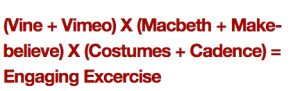
Vine:  If a picture is worth a thousand words, what’s a six second video worth?  Some would call Vine a video recording device, but I use it as a communication device.  Vine can connect to your classroom Twitter account.  When parents click on the Twitter Vine link, a new page will pop out that displays the video.  Here’s an article that shows a few different ways to use Vine in the classroom. I’ve used Vine to show how students use math manipulatives, present projects, work collaboratively, classroom arrangements, iPad usage, and many more activities in the classroom.

Vine and Macbeth Example
Vine and Macbeth Example from @morgetron’s class blog

There are many different ways to communicate all the great things that are happening in your classroom.  I just emphasized three in this blog post.  What are you favorites?

* Image credit:  Mim

Taking Math Outdoors

Math Outdoors

Recently I had an opportunity to attend an outdoor education trip with our elementary students. The trip took place over three days and was located in a very remote part of the state, away from high rises, city lights, cell phone signals, and televisions.  The trip focused on learning about birding, forest ecology, Native Americans, orienteering, and pioneering.  For many students this trip is a different learning experience.  It’s outside of the classroom and therefore a different learning environment for them. Acclimating to this environment took a bit of time for staff and students.

The adults were responsible to teach many of the concepts during hikes on campus.  Being outside is a great opportunity to introduce or highlight academic concepts that are generally taught through abstract means.  While talking about math outdoors, students expressed interest and asked questions that often led to additional mathematical questions.  Students that might not usually be fully engaged in a math lesson at school were shining on the hike. This experience led me to reflect on our current mathematical practices.  At times there’s a disconnect between what’s happening in the classroom and what’s occurring right outside of the doors to the school.  Teachers often attempt to bridge the gap, but self-directed student questions often come from real world experiences and curiosity.  Curiosity is often followed by questions.  Finding answers to those questions can lead students to find their passions (eg. #geniushour).  This motivation can be encouraged but not genuinely bought or sold.  Students decide how engaged they want to be and internal/intrinsic motivation often leads to learning experiences.

Below are some (of what I can remember) of the questions/topics that were discussed while on the trip:

Concepts


Multiple Technology Devices or 1:1?

Penguin Multiplication

It’s becoming increasingly evident that technology continues to change the education landscape.  The landscape now consists of a variety of technology tools that teachers can use to facilitate the learning process.  If you look around the field of education you’re most likely going to find more schools that are going 1:1 with iPads (1 2 3) or Chromebooks (1 2 3).  I’ve even heard of schools that are using Kindles or tablets to replace textbooks. It can be challenging to decide what type of technology to order for your school district.  Should you go 1:1 or allow funding for multiple devices in the classroom?  I’m hoping to provide a different perspective on that topic through this post.

I’ve used iPads in the classroom and appreciate the many useful characteristics that they bring to the learning environment.  Students are often engaged while utilizing iPads and the user-friendly interface allows little transition time.  I’ve used iPads for individual math interventions, small group instruction, whole class problem solving activities, and math research.  The fast startup time, battery life, and enormous app selection makes iPads a contendor.  Regardless of all of the positives, I’m still looking for ways to create projects on the Ipad. I believe the iPad is primarily still considered a media consumption device first and a creating tool second.  Maybe this will change in the future?  For project creation involving increased keyboard volume, Flash, precision beyond fingers, and faster processing speeds a laptop/netbook might be a better choice.

Laptops/Netbooks bring additional processing power that an iPad may lack.  Recently my students created a podcast project that could only be completed on a computer.  The iPad has many podcasting apps, but all that I tried lacked the additional features that were needed.  Netbooks also provide opportunities to use open source education software.  This is often not possible with iPads.  From my experience, netbooks often fall short in battery life and startup times, although this is improving.

A document camera brings value to my classroom.  Everyday I use a document camera to display student work and model examples.  My document camera is connected to an LCD projector which displays images on a whiteboard.  Displaying work on the whiteboard and being able to use markers to make corrections or highlight exemplary work is extremely beneficial.  I don’t think I could go a day without using the document camera.

Of course there are many different ways to use technology in a math class.  Relying on only one option (like 1:1) without even considering computers may limit the opportunities for student learning and exposure.  Multiple devices, like iPads, netbooks, laptops, document cameras, tablets, Kindles, and ____ all have different uses.  Understanding how to utlize the technology at the right time is important.  Preparing our classrooms with multiple devices allows students the opportunity to pick the right tool for the project.  I believe we should model, but then give students the responsibility to decide what technology tool to use to complete the task.

What do you think?

The Power of Education Naysayers

Do we want conformity?
Should conformity be the norm?

More often than not, most schools have a naysayer or a group of naysayers.  A naysayer might not necessarily agree with a school’s initiatives or mandates. These staff members are often perceived as being negative or confrontational.  Naysayers might not participate on district or leadership committees.  They might assert their opinions regarding education funding, history of education, evaluations, response to intervention, student data, status quo,  leadership, initiates, etc.   I feel like most teachers have met a naysayer.  You might even be a self-proclaimed naysayer or skeptic.  Naysayers often feed off one another and their ideas can be contagious.

Regardless of how naysayers are perceived, they have power.  I find that teachers want what’s best for students.  Beyond the overarching goal of wanting what’s best for students, teachers’ philosophies differ.   These opinions can start arguments and can cause disruptions among teams/schools.  Confrontations can cause disruptions if not handled properly by administration. Experiences and opinions should be valued and communicated with candor.  Everyone who is part of the education organization is valued and that should be communicated as well.

Screen Shot 2013-04-06 at 12.29.23 PM

Being labeled a a naysayer doesn’t have to have a negative connotation   You might be called a naysayer if you aren’t a fan of the status quo in a school or district.  Is that bad?  You might disagree, but being a positive change agent in a school might start by being called a naysayer. Naysayers that bring solutions to the table introduce ideas that may encourage others to innovate.  Conforming isn’t always an option when challenging decisions need to be made. Disagreement may bring a different perspective and initiate a positive change in an organization.  Teacher strengths and ideas may often remain hidden until called upon.  Encouraging naysayers to join school leadership teams and become more involved in the decision making process may benefit your school.

Are you a naysayer?

photo credit: the|G|™ via photopin cc

Web-Based Math Differentiation in Elementary Schools

Different Learning Paths for Different Students

It’s apparent that student achievement data, in many different forms (formative, standardized, norm-referenced, common assessments, etc.) is becoming increasingly valued by administrators and teachers alike.   Teacher PLC teams analyze this data to become more aware of strengths/concerns and differentiate their instruction accordingly.   Instead of whole group instruction, teachers are beginning, or already using guided groups to meet the diverse academic needs of their classroom.

Once needs are identified, teachers put together plans to address the needs in the classroom. Generally, teachers utilize guided reading/math groups, small groups, resource specialists, to meet the needs of individual students, whether the needs are remedial or for enrichment purposes.  One of the goals is to meet the need with some type of teacher support or intervention; although this is not always possible with time constraints and limited staffing.  Have time to be able to individualize instruction is vital for any teacher.  At times, time and staffing limit the amount of differentiation that can occur.  Teachers continue to look for ways to supplement their instruction for differentiation in and outside of their classroom.  Which leads me to this question …

What free online tools can be used to supplement math differentiation in and outside of the classroom?

Note:  All of the tools below are aligned to the Common Core Standards and can be accessed at school or home.  I’m not suggesting that these tools replace school interventions, but they may be helpful if used appropriately.  Click the pictures to enlarge.

MobyMax 

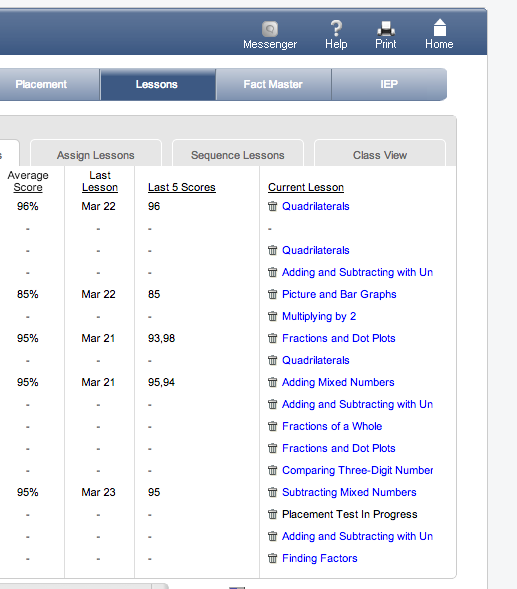
MobyMax is an adaptive online curriculum provider that creates individual education plans for students.  Student take a pre-assessment that seems to be fairly accurate (at least in my opinion).  The pre-assessment determines where to start instruction and helps students practice skills that they haven’t yet mastered.  Student data is collected on every lesson and problem that is completed, so progress monitoring is quite painless.  Mobymax also has an app for easy access.

MobyMax - You can assign specific concepts for differentiation
MobyMax – You can assign specific concepts for differentiation

Scootpad

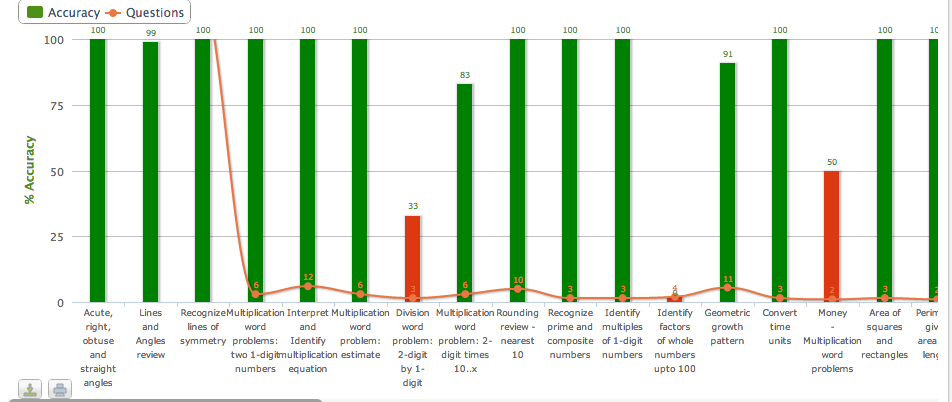
Scootpad is another adaptive curriculum provider that enables teachers to assign specific CCSS concepts to individual students.  Teachers determine the mastery level and they are able to keep track of individual student progress.  As of right now, there aren’t any lessons associated with the questions.

Scootpad - You can analyze performance on specific concepts
Scootpad – You can analyze performance on specific concepts

TenMarks

TenMarks is used to introduce or reinforce teaching in the classroom.  Students are able to review online lessons and are asked questions related to the topic.  Teachers are able to track student progress over time with TenMarks.

TenMarks - Allows lessons to be interactive with feedback
TenMarks – Lessons are interactive with feedback

XtraMath

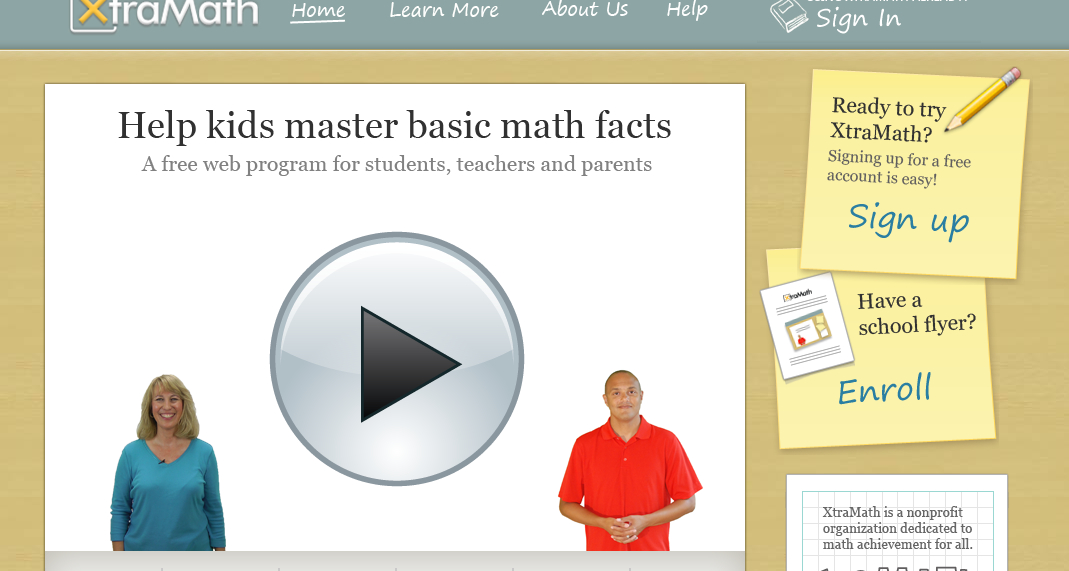
Xtramath is designed to help students improve their math computation fluency.  This isn’t a program that’s for everyone.  I’ve found that students who need practice with multiplication/division tables benefit from this web-based intervention.  The program is very user-friendly and has a progress monitoring component which seems beneficial.

XtraMath - Students practice math computation facts
XtraMath – Students practice math computation facts

Photo credit: weesen via photopin cc


What tools do you use to differentiate instruction in/out of the classroom?

Letting Students Decide

You Decide

Last week I decided to introduce one of my math classes with a complex algebra problem. The problem had multiple solutions and a variety of different ways to achieve the answers.  I grouped the students and they began to discuss methods to solve the problem. Each group was given an iPad, whiteboard and marker to get started.  After approximately ten minutes I had group coming up to me asking if they were on the right track.  I asked the students to decide on what path to take to solve this problem. The students waited for additional instruction but I decided to say no more. Often, students are looking for affirmation or some type of hint.  I told the students to rely on their math skills to validate why they think their solution is best. The students went back to their group and continued to work and validate their reasoning.  Students continued to have questions and I decided to answer those questions with questions that pointed students in the right direction. By facilitating and guiding I felt as though students were taking more ownership of their own learning.  After approximately thirty minutes student groups presented their answers to the class.  The majority of groups indicated that they hit multiple roadblocks, but eventually achieved some sort of success in finding a solution to the problem.  After listening to the presentations I concluded that the students took another step this year towards becoming responsible learners in the classroom.  Moreover, I found myself reflecting on what was communicated to the students during the process.

The words you decide can be powerful.  In a classroom setting, the words can enable students to make decisions that impact their learning.  Students need to be able to take ownership of their own decisions and what a teacher communicates can benefit or limit learning in the classroom. I’d like to move my students beyond the stereotypical systematic focus of finding the one right answer.  Mathematical understanding might not permeate when students feel that finding the answer is the only goal.  Giving students opportunities to make decision within a safe environment prepares them to own their own learning and become more accountable in the classroom.

What strategies do you use to encourage student ownership?

Photo Credit:  S. Miles